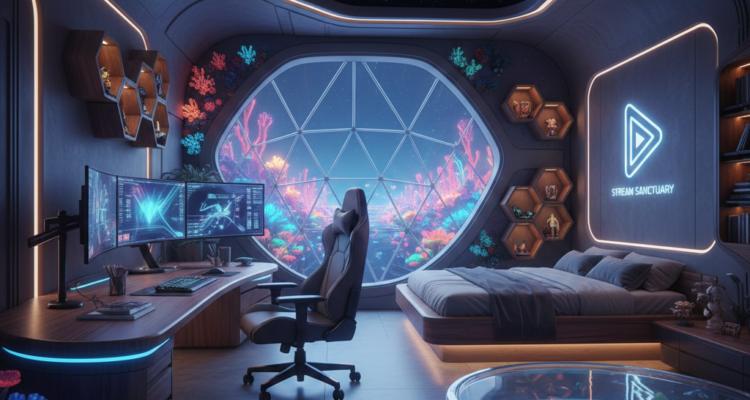
The rise of content creation has transformed streaming rooms from casual setups into sophisticated multifunctional environments. These spaces must balance high-performance technical requirements with personal comfort and brand expression. Successful streaming room design integrates ergonomic principles, acoustic engineering, lighting design, and technology infrastructure to create spaces that support both creator well-being and production quality.
Foundational Design Pillars
Modern streaming room architecture rests on four essential pillars that work together to create an optimal environment.
Ergonomic and Health-Focused Design
Streaming requires extended periods of focused work, making ergonomics critical for long-term health and performance:
· Adjustable workstations: Height-adjustable desks with memory presets allow transitions between sitting and standing positions.
· Specialized seating: Ergonomic gaming chairs with advanced lumbar support and breathable materials maintain comfort during marathon sessions.
· Monitor positioning: Articulating monitor arms enable perfect eye-level positioning to reduce neck strain.
· Movement integration: Anti-fatigue mats and small wellness corners designed for stretching breaks address the physical demands of streaming.
Acoustic Architecture
Professional audio quality separates amateur streams from professional productions:
· Sound isolation: High-performance soundproofing minimizes external noise intrusion, while floating flooring systems reduce vibration transfer.
· Acoustic treatment: Customized acoustic panels in brand colors, bass traps, and diffusers create balanced room acoustics for crystal-clear voice recording.
· Dedicated recording spaces: For advanced setups, compact isolation booths provide studio-quality vocal recording within the streaming environment.
Lighting Ecosystems
Lighting serves both functional and aesthetic purposes in streaming rooms:
· Intelligent systems: RGBIC LED systems with scene presets adapt to different content types, while smart lighting synchronized with streaming software enhances production value.
· Eye health considerations: Bias lighting reduces eye strain during extended screen time, protecting creator health.
· Camera optimization: Adjustable color-temperature lights ensure optimal appearance on camera, with three-point lighting setups (key light, fill light, and back light) creating professional visual results.
Technology Infrastructure
A seamless technical backbone supports all streaming activities:
· Integrated systems: Hidden cable-management channels maintain clean aesthetics, while motorized camera mounts and professional green-screen systems enable dynamic production.
· Power management: Smart power systems with surge protection and backup units protect valuable equipment.
· Wireless integration: Built-in wireless charging surfaces and custom liquid-cooled streaming PCs with display windows combine functionality with visual appeal.
Spatial Planning and Functional Zoning
Effective streaming room design divides space into dedicated functional areas, even within limited square footage.
Primary Performance Zone
The central gaming or content creation station requires optimization for peak performance. This area typically features the main computing equipment, primary display(s), and essential peripherals arranged for maximum efficiency during streaming activities.
Production and Control Area
A fully equipped streaming corner with professional lighting, microphone setup, and camera equipment forms the production heart of the room. This zone may include a separate station for managing stream software, overlays, and viewer interaction.
Content Development Station
Many creators benefit from a dedicated area for video editing, graphic production, and content planning separate from the live streaming setup. This separation allows simultaneous activities like editing previous content while maintaining a ready-to-stream primary station.
Collaboration Space
For streamers who host guests or participate in co-streams, a designated collaboration area with additional seating and equipment facilitates interactive content without disrupting the main setup.
Brand Expression Zone
Display shelves showcasing collectibles, themed décor, and brand elements personalize the space while reinforcing creator identity during streams. This area transforms technical infrastructure into a storytelling backdrop that engages viewers.
Technical Specifications and Equipment Integration
Video Production Equipment
· Camera selection: While webcams like the Logitech C920 offer budget-friendly quality, DSLR or mirrorless cameras provide superior image quality and depth of field for professional streams.
· Multi-camera setups: Advanced configurations employ several cameras—standard face-cam, 45-degree angle shots, and overhead views—for dynamic production value.
· Display configuration: Multiple monitors (often including a vertically oriented secondary display) allow simultaneous gameplay, chat monitoring, and stream management.
Audio Engineering
· Microphone selection: USB microphones like the Blue Yeti offer beginner-friendly quality, while XLR microphones (requiring an audio interface) deliver professional-grade audio.
· Acoustic treatment: Soundproof foam panels, heavy curtains over windows, and floor coverings minimize external noise and reduce room echo.
· Audio monitoring: Quality headphones enable real-time audio monitoring without creating feedback loops during streams.
Connectivity and Workflow
· Internet requirements: A minimum upload speed of 5 Mbps is necessary for streaming, with 10 Mbps or higher recommended for HD content. Wired Ethernet connections provide more stability than WiFi.
· Computer specifications: Systems should have at least an Intel Core i5-4670 processor (or equivalent), 8GB of RAM, and a graphics card supporting hardware-accelerated encoding.
· Stream management: Streaming software like OBS, Streamlabs OBS, or Restream Studio enables scene switching, overlay application, and multi-platform broadcasting.
Design Approaches and Aesthetic Directions
Streaming rooms can follow various design philosophies depending on creator personality and content type.
Thematic Design Approaches
· RGB-Integrated Environments: Synchronized LED systems across ceilings, desks, and PC interiors create immersive, reactive light shows that enhance on-camera dynamics.
· Minimalist Professional Studios: Clean lines, neutral color palettes, and hidden cable management project sophistication suitable for diverse content types.
· Personality-Driven Spaces: Collections, artwork, and décor reflecting specific interests (gaming, music, education) create authentic backdrops that strengthen brand identity.
· Green Screen Studios: Chroma-key backdrops offer maximum flexibility for digital background changes, though they require precise, even lighting for optimal results.
Space-Optimized Solutions
· Compact Broadcast Booths: Even small spaces like converted closets can become effective streaming stations with strategic equipment selection and organization.
· Multi-Functional Rooms: Spaces serving dual purposes (bedroom/streaming room, living room/streaming studio) require thoughtful planning to maintain functionality for all uses.
· Console-Focused Setups: Living room configurations centered on large displays and comfortable seating cater to console gamers while maintaining professional streaming capabilities.
Implementation Considerations
Budget and Phasing
Streaming room development typically follows a phased approach:
- Foundation phase: Essential equipment (computer, basic camera, microphone, lighting) establishes functional capability.
- Optimization phase: Acoustic treatment, ergonomic furniture, and improved lighting enhance quality and comfort.
- Professionalization phase: Advanced equipment (multiple cameras, high-end microphones, specialized controllers) elevates production value.
Brand Integration
Visual consistency across streaming backdrop, on-screen graphics, and digital branding reinforces professional identity. Color schemes, logos, and design motifs should extend throughout the physical space and digital presentation.
Future-Proofing
Modular furniture, adaptable mounting systems, and scalable technology infrastructure allow rooms to evolve with changing equipment and content styles. Wireless technologies and standardized connections facilitate equipment updates without complete redesigns.
The architectural design of streaming rooms represents a specialized intersection of ergonomic science, acoustic engineering, lighting design, and digital infrastructure. Beyond technical specifications, successful spaces balance functional requirements with personal expression, creating environments that support both creator well-being and audience engagement. As streaming continues to evolve as a medium, these dedicated spaces will increasingly reflect the professionalization of content creation, with design principles adapted from traditional broadcast environments while maintaining the authentic personality that defines individual creators. The streaming room has transformed from a simple corner with a webcam to a sophisticated content creation studio, representing a significant evolution in how dedicated spaces support digital expression and community building.

We Don’t Just Design Buildings; We Engineer Landmarks that Stand the Test of Time.
Let’em Know !
Share with friends and family.